Contents
This post moved here from “Obsidian × GTD × Claude Codeでタスク管理の沼から抜け出す(1日目)” on Shizuka na Internet, where it was first written in Japanese.
How I used to do it, and what hurt
Until now I ran my task management on a GTD setup built in Notion: dump everything in my head into the Inbox, then sort it out.
But with that setup, letting AI triage and manage tasks never really worked, and it frustrated me that even in this day and age it still relied on a human doing the hard work. I also started wanting the AI to take my roughly jotted tasks, split them into the right granularity, make the wording consistent and file them under the category (project) they belong to. (Partly because voice input is just too easy. And having already paid for ChatGPT and Claude Code Max 20×, I couldn’t bring myself to pay for Notion AI on top.)
I’d also set up an iOS Shortcut that hit the Notion API so I could fire off a TODO instantly, but checking daily tasks in the Notion app was pretty hard on the eyes, so I wanted to fix that as well.
(For Notion × GTD I borrowed a lot from this person’s approach.)

Making it easier with AI
Roughly, the plan was:
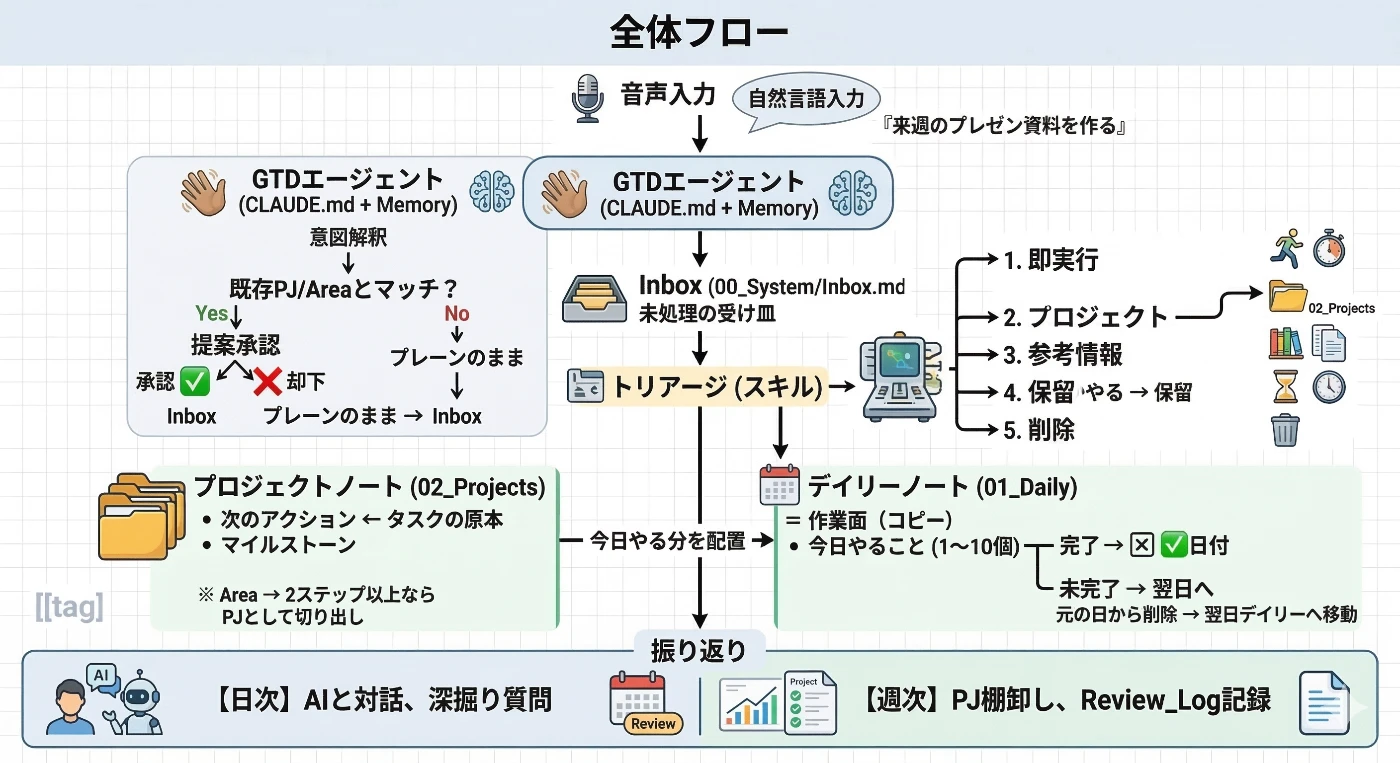
Throw task-ish things in natural language, by voice, at an agent that understands GTD. If a higher-level project that matches already exists, the agent suggests linking the task to it. Completing and triaging tasks are split out as skills, so it directs the traffic for me. Reviews, too, carry enough context that I move through them by answering the AI’s probing questions.
With that in mind I quickly built a prototype. (I had Nano Banana draw the diagram, but my prompt was bad and it came out cluttered. Sorry it’s hard to read.)
What I did on purpose
1. Start by planning through conversation
I brought a rough idea of what I wanted and planned it in a conversation with the AI. Whether you’re writing code or a spec, I think it’s the same: first, talk it through to find out whether my thinking is missing any angles, and whether there’s room to improve as I turn it into a system. If you skimp here the foundation falls apart, so this is where I spent the most time.
2. Teach Claude the core ideas of GTD
By giving Claude the underlying philosophy up front, I made its stance clear: the premise, what I want and what I don’t. After that, whenever I proposed something that seemed off course, it told me frankly where it diverged from GTD’s core ideas, and we could build the system constructively without it getting bloated.
3. Keep order with hooks
However much you write in CLAUDE.md or rules, some things will eventually break unless they’re strictly enforced, so I wrote hooks for the policies I want followed to the letter. In practice it’s just Python scripts running against Markdown files, but it gives me guardrails that hold even after the session is cleared, which is reassuring.
What I want to improve next
It breaks easily if you don’t go through Claude
Handing the rules and triage over to the AI, so it manages my tasks like a secretary, looks really promising. But a few places can still break if I edit the Markdown files directly (it’s not a single source of truth everywhere, which is bad), so that’s pure room for improvement. Notion made this kind of thing much easier, in my impression. (But I can’t pay for Notion AI too.)
Having both VS Code and Obsidian open is a pain
Because I manage tasks by talking to Claude with voice input, I can’t do it all inside Obsidian. There are plugins, but they don’t fit how I use it yet. And VS Code isn’t as easy to read as Obsidian, so I end up with both open. I’d like to settle on one.
No nice visual dashboard like I had in Notion
Asking Obsidian for something like a dashboard would probably fall apart, so I can’t build anything very rich. This might turn into a bottleneck, but for now it’s not a big problem. For now. (The built-in Bases feature might make it a bit better?)
It doesn’t really work unless I open my laptop
This is the biggest problem. I’ve become more and more motivated to move away from chatting inside VS Code and have the master data updated properly while I talk on Slack or LINE instead, so I want to explore running it with something like OpenClaw, granting it only the minimum permissions.